Lead touch history
Every touch your reps log stays on the lead.
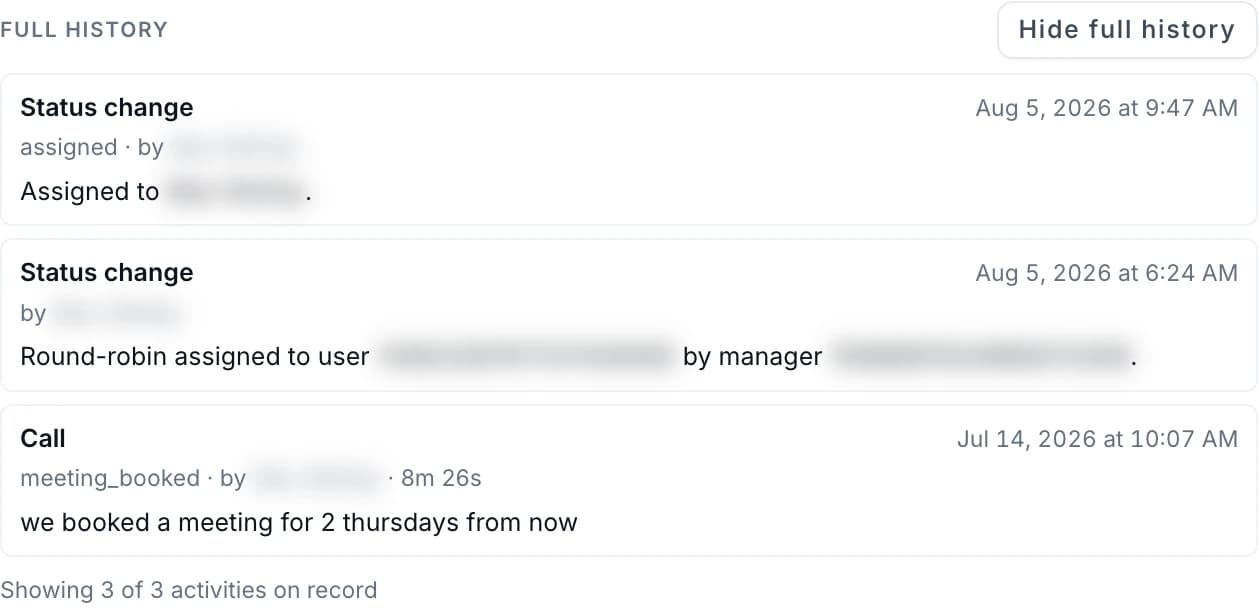
Calls, texts, emails, LinkedIn touches, notes, status changes and dispositions are saved on the lead they were logged on, with the date and the rep who logged them. Deal-level attribution is not built.
Managers read the same record the reps write.
Ten free leads first. Nothing to sign until you decide.
Sound familiar?
Four things sales leaders tell us before the work lands on one record.
Nobody knows who touched the account last.
One rep calls, another emails, a third adds a note. The story lives in three places.
The history leaves with the rep.
Notes live in someone's head. When a rep moves on, what happened on each account goes with them.
Nobody knows why the status changed.
A lead moved stages or got dropped. The reason never got written down.
Nobody can say where a lead came from.
Was it a list, a referral, a data pull? Months later nobody remembers, so nobody can judge the source.
One lead, one history. Every call, text, email, LinkedIn touch, note and disposition your reps log stays on the lead it was logged on, so the record does not leave with the rep.
How it works
Three steps. No separate report to fill in.
Work.
Reps call, text, email and work LinkedIn from one lead card. One login, nothing to install.
Log.
Each call, text, email, LinkedIn touch, note, status change and disposition is saved to the lead, with the date and the rep who logged it. The rep logs each email and LinkedIn touch by hand.
Read.
Open View full history on the lead card to read that lead's record. Open the lead in Management to see its source and the day it arrived.
Three views. One record of the work.
Every view reads from the lead records your reps work.
Every logged touch on the lead, in one history.
Open View full history on the lead card. You see the calls, texts, emails, LinkedIn touches, notes, status changes and dispositions logged on that lead, each with its date and the rep who logged it. Load more to go further back.
The history is the lead's own record, not a separate report.
What this covers
- Calls, with the outcome the rep logged and the call length
- Texts, and the emails and LinkedIn touches the rep logs
- Notes in the rep's own words
- Status changes and dispositions
See the recorded source of each lead.
In Management, the lead's detail opens with an Account intelligence card. It shows the lead's Source and the day it arrived. It also shows how many signals from your Ideal Customer Profile the lead matched, and the enrichment confidence and ICP score when the lead has them.
The source stays on the lead.
What this covers
- The Source of the lead
- The day the lead arrived and how many days ago
- Enrichment confidence, when the lead has it
- ICP score and signals matched
What the team reads from the record.
Managers open the Analytics view from the same login and see the funnel, the channel mix, the call outcomes and the rep leaderboard. Each number comes from the touches your reps log on the lead card. There is no separate report to fill in.
Built from the lead records, not a weekly export.
What this covers
- Lead counts at every stage and the conversion to the next
- Calls, emails and LinkedIn touches counted side by side
- Call outcome mix across the team
- A rep leaderboard, with each rep's calls behind it
Pricing
Free cards first. Then a price in writing.
Nothing until your reps have dialed the free cards. Then one of three plans: run the platform yourself, have our team do the calling and book the meetings, or pay per booked meeting. Prices are on the pricing page, and we do not take payment before your reps have tested the platform.
Four things that stay true.
Most sales tools try to do too much. This one keeps the record of the work and stays out of your reps' way.
Your reps make every contact.
We never contact your prospects without your oversight and approval. Your rep places the call, sends the text, posts the LinkedIn message, and reviews and sends the email.
Managers read what reps log.
The history a manager opens is the same one the rep writes. There is no separate report to fill in.
Ten free leads first.
Your reps work ten lead cards and grade every one before you decide.
Nothing to install.
One login opens the lead cards, Plan, Flow State and Analytics.
Guardrails on every touch.
The platform checks before your reps reach out, and it keeps the record after.
A call outside contact hours is refused until the window opens.
A call to a lead marked do not call is refused.
A contact who opted out cannot be texted again. Texting is for US numbers.
When a rep logs a person's number as wrong or bad, your team cannot call or text it again.
The rep sends each LinkedIn message by hand and logs the touch.
A lead's history opens only for signed-in people on your team who can see that lead.
What is not built today.
Deal-level attribution is not built. Here is what that means, in plain words.
Touches tied to a closed deal
The platform does not show which touches led to a closed deal.
Deal value or revenue
No deal amount or revenue is recorded against the touches.
Outcomes from your CRM
The platform does not read closed or won deals from your CRM.
First-touch or last-touch models
There is no first-touch, last-touch or multi-touch model.
Straight answers.
Common questions from sales leaders.
Start the record. Then decide.
Tell us who your team sells to. We define your Ideal Customer Profile on the first call, build ten lead cards from it, and your reps work and grade every one before you decide.
Questions? Email [email protected]