SDR scripts
Scripts written for the lead your rep is working.
When a rep works a lead, the sales workspace writes that lead its own call scripts, emails and LinkedIn messages, plus a voicemail leave-behind taken from a call script. They are written from the same facts the lead card shows.
Your reps make every contact. We never contact your prospects without your oversight and approval.
Ten free leads first. Nothing to sign until you decide.
Sound familiar?
Four things sales leaders tell us about scripts before they see them on the card.
The script is a doc nobody opens.
One template sits in a shared folder. Reps stop reading it, and every call starts from scratch.
One script for every lead.
The same opener goes to every company, so it fits none of them.
Research eats the dialing time.
Reps read up on the company, find the reason to call, then write the email. By then the hour is gone.
The follow-up says the same thing again.
The second email repeats the first, and the second pass sounds like the first pass.
Written from the card. Scripts are written from the same facts the rep already sees on the lead card, for that one lead.
How it works
Three steps. The rep stays in control.
Work.
A rep vets a lead, opens it, or has it coming up in Flow State or Plan.
Write.
The workspace writes that lead its own set of scripts in the background and saves them on the lead. Opening a card never waits on writing. Until the set arrives, the rep sees a labeled starter.
Use.
On a call step in Flow State, the rep reads the script beside the dial button. On email and LinkedIn steps, the rep edits the message and sends it themselves.
Scripts inside the workspace your reps already use.
Scripts show up in Flow State, on the lead card and in Management. One login, nothing to install.
Calls, emails, LinkedIn and a voicemail, written for one lead.
When a rep works a lead, the workspace writes that lead its own set of scripts. They are written from the same facts the lead card shows: the contact's name and title, the company, the Why this lead explanation, the opening angle, the buying signals and the evidence.
Written for one lead from the facts on its card, not from a shared template.
What this covers
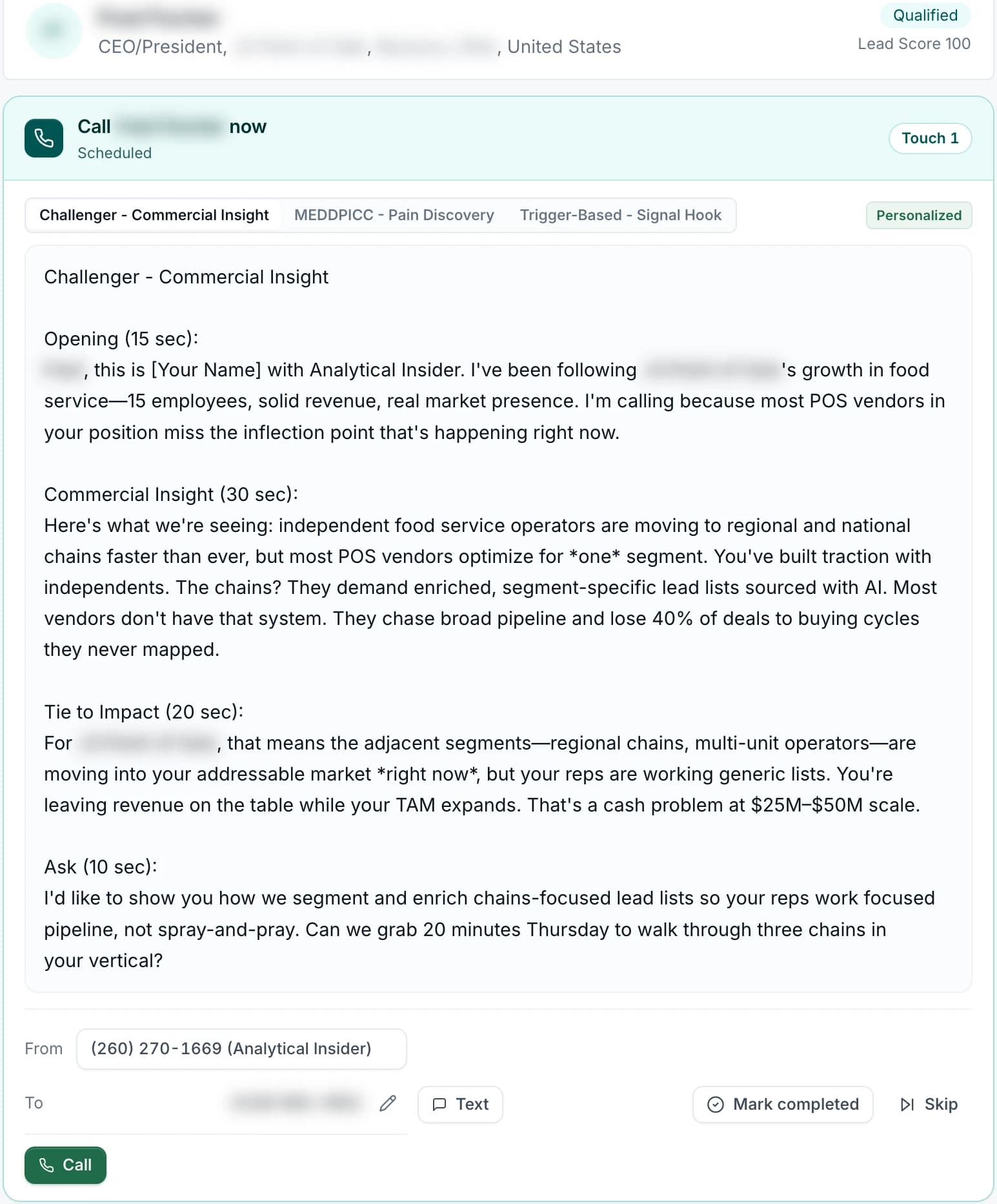
- Three call scripts: one opens with an insight, one asks about the pain and who decides, one opens on the trigger that makes the timing matter
- Three emails: an opener, a follow-up that names one buying signal, and a third with a peer angle
- A LinkedIn connection note and a longer LinkedIn message
- A short voicemail leave-behind taken from the start of a call script
The script sits where the rep is working.
On a call step in Flow State, the card shows that step's script under Suggested opener, beside the dial and text buttons. When there is none, it says: No opener for this step. Lead with what you know. On email and LinkedIn steps, the same script fills in the message for the rep to edit.
When a call step has no opener, the card says so.
What this covers
- Each step of a lead's contact plan points at a script for that step's channel, and some steps share the same text
- The LinkedIn composer on the lead card starts with the connection note filled in
- The Opening angle field on the lead card copies in one click
- In Management, reps switch between script variants tagged Personalized or Quick start
Scripts that keep up with the lead.
Scripts are written in the background and saved on the lead. A lead with nothing saved yet shows a labeled starter until its written scripts arrive. A lead gets a fresh set after it is vetted and after a connected call, a positive reply, or a LinkedIn reply or acceptance.
A fresh set after vetting and after each positive outcome.
What this covers
- On a second pass with the same contact, new scripts are written to take a different approach and say the rep is following up
- A new contact gets scripts written as a first touch, with no mention of earlier outreach
- A draft the rep started on the lead card or in Management is kept when the written script arrives
- Scripts are private to the lead's team
Pricing
Free cards first. Then a price in writing.
Nothing until your reps have dialed the free cards. Then one of three plans: run the platform yourself, have our team do the calling and book the meetings, or pay per booked meeting. Prices are on the pricing page, and we do not take payment before your reps have tested the platform.
Four things that stay true.
Scripts help your reps say the right thing. They never speak for them.
Your reps make every contact.
We never contact your prospects without your oversight and approval. The rep places the call, sends the text, posts the LinkedIn message, and reviews and sends the email.
Part of the workspace.
Scripts are part of the sales workspace, in Flow State, on the lead card and in Management. They are not a separate product.
Labeled plainly.
In Management, a starter built from the lead's own fields is tagged Quick start. A script written for that lead is tagged Personalized.
Nothing to install.
One login opens the lead cards, Plan, Flow State and the scripts.
Guardrails on every script.
Scripts are text for the rep. The rep decides what goes out.
The rep places every call. The call script is read-only text on screen.
The email script fills an editable subject and body. The rep reviews and sends it.
The rep edits the LinkedIn message, sends it by hand on LinkedIn and logs the touch.
There is no text-message script. The text box starts empty for the rep's own words.
Scripts need a signed-in session. A rep who cannot see the lead cannot see its scripts.
Edits are not saved back as the lead's script. On the lead card and in Management, a draft the rep started is kept when the written script arrives.
Straight answers.
Common questions from sales leaders.
Read the card. Then decide.
Tell us who your team sells to. We define your Ideal Customer Profile on the first call and build ten lead cards from it. Your reps work every one before you decide.
Questions? Email [email protected]